Address
304 North Cardinal St.
Dorchester Center, MA 02124
Work Hours
Monday to Friday: 7AM - 7PM
Weekend: 10AM - 5PM


Powering the Future of Server Infrastructure
Powering the Future of Server Infrastructure
 Byhyperserver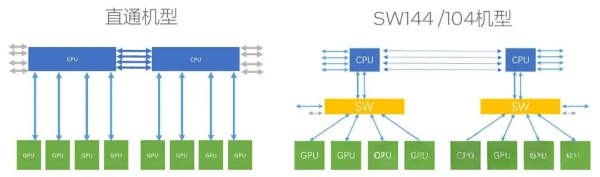
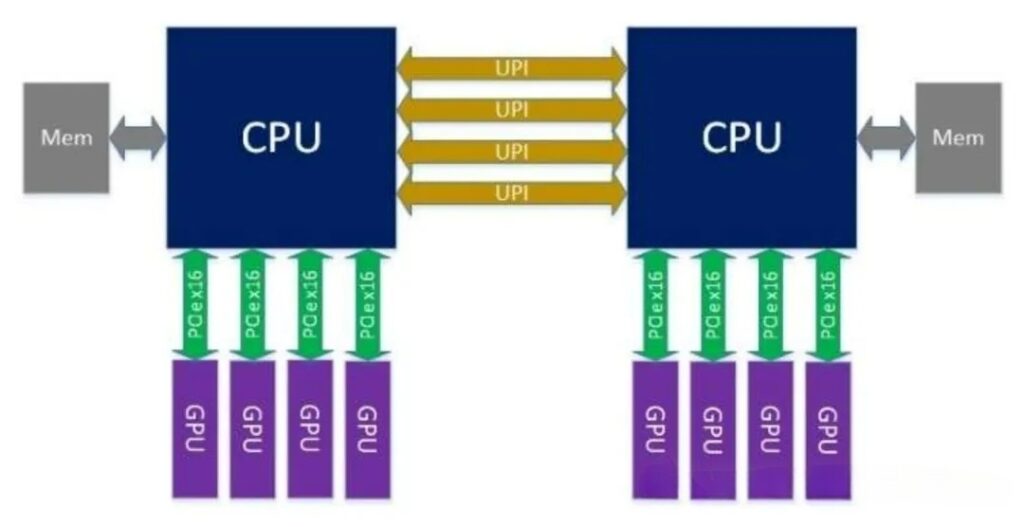
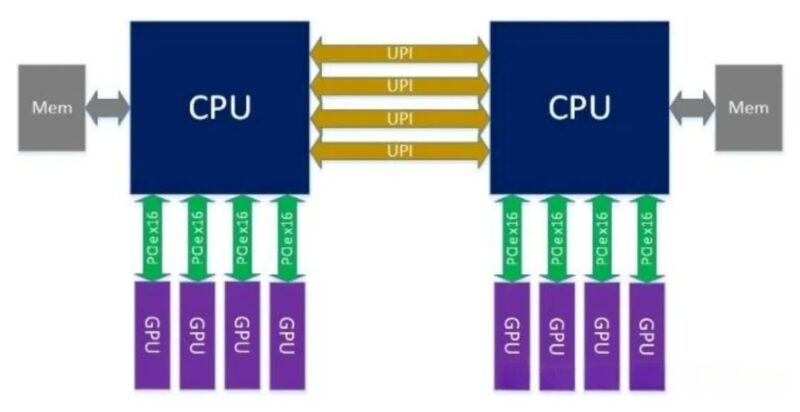
1)Topology: GPUs are attached via PCIe x16 directly to the CPU’s PCIe Root Complex, with no intervening switch chip.
2)Typical Configuration: Dual-socket CPU (e.g., Intel Xeon/AMD EPYC), each CPU provides 64–128 PCIe lanes, directly connecting 4–8 GPUs (x16 each).
3)Links: The CPU ↔ GPU connection is point-to-point; GPU-to-GPU communication must be forwarded via the CPU (PCIe tree topology).
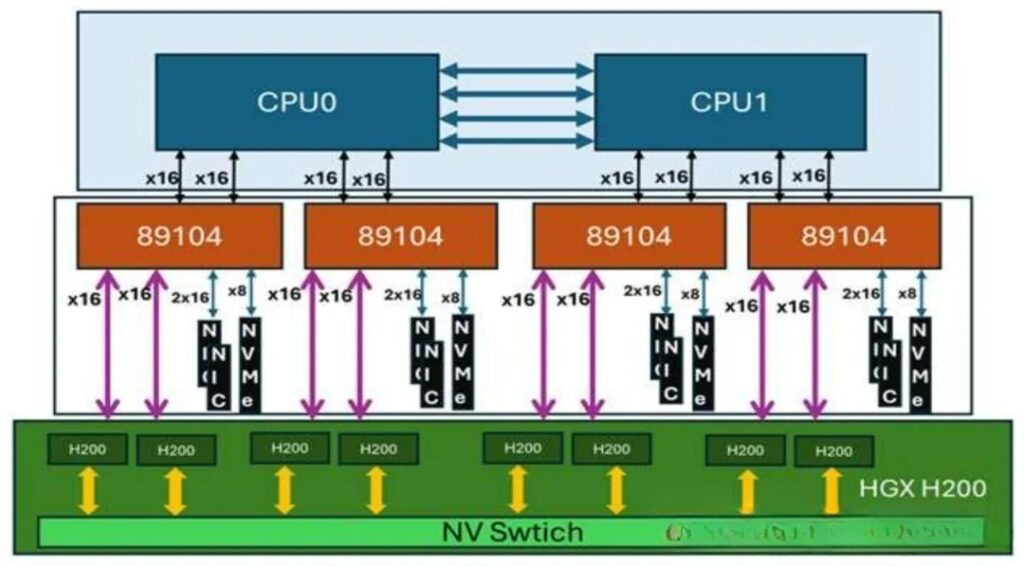
1) Topology: The CPU connects to the PCIe switch chip via uplink ports (x16/x8), and all GPUs attach to the switch’s downlink ports, forming a star (switched) topology.
2) Chip Specifications (PCIe 5.0, 32 GT/s):
PEX89104: 104 lanes, configurable into multiple x16/x8/x4 ports, typically used for expanding 8–12 GPUs.
PEX89144: 144 lanes, for larger-scale expansion, supports 12–16 GPUs or multi-host sharing.
3) Links: CPU ↔ Switch ↔ GPU; GPUs can communicate directly through the switch without involving the CPU.
| Max GPU Count | |||
| CPU Lane Usage | |||
| Remaining Lanes | |||
| Multi-Host Support | |||
| Hardware cost | |||
| Power Consumption |
1)CPU ↔ GPU
2)GPU ↔ GPU (Key difference)
3)Typical Data (PCIe 5.0)
1) Direct Attach: Simple driver requirements, best compatibility, no extra configuration; virtualization (SR-IOV) support is limited.
2)Switch: Requires Switch driver/management software, support advanced features (such as NTB, ot-plug, bandwidth scheduling), and provides stronger virtulization and resource-pooling capabilities.
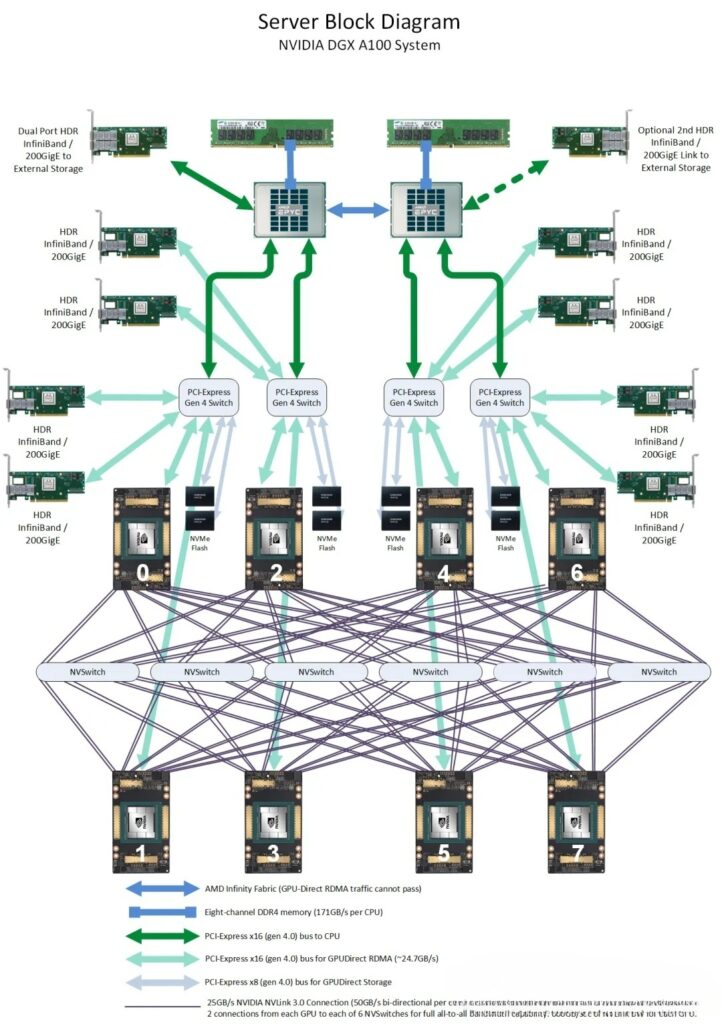
1)Direct Attach: Small-scale AI training/inference(≤8 GPUs), single-precision compute, general-purpose computing, cost-sensitive scenarios, or cases with minimal GPU-to-GPU communication.
2)PEX89104: Medium to large-scale AI training (8–16 GPUs), HPC, multi-GPU collaboration, requiring expansion for additinal NICs/NVMe cloud servers or compute pooling.
3)PEX89144: 超Ultra-large-scale AI training (≥16 GPUs), multi-host GPU sharing, high-density compute nodes, scenarios with extremely high scalability requirements.
1)GPU count:≤8 GPUs → Dirrect Attach;8–16 GPUs → PEX89104;≥16 GPUs → PEX89144。
2)Inter-GPUCommunication:Communication-intensive(e.g. large model training)→ prefer Switch; sparse communication → Dirrect Attach.
3)Scalability Needs:Requiring external high-speed NICs, NVMe, FPGA → prefer Switch。
4)Cost and Power:Limited budget or power-sensitive → Direct Attach; emphasis on performance and scalability → Switch.
1)Direct Attach: Simple, low-cost, low-latency, but poor scalability and inter-GPU communication bottleneck; suitable for small-scales scenarios.
2)PEX89104:Balanced expansion and performance, making it a mainstream choice for medium to large-scale AI/HPC.
3)PEX89144:Maximum expansion capability, aimed at ultr-large-scale clusters and high-density deployments.